Introduction
HTTP servers are the systems which implements request/response model which uses the HTTP protocol. The HTTP server takes requests from the client over HTTP protocol and serves the content over the internet.
I wanted build my own webserver to understand how they are actually built. This is my simple approach in building a webserver using Python.
I am making use of the built-in python module called socket which provides low level interface for network communication.
Build a basic server
Initially started with a basic HTTP server which takes request from the client and just returns a hardcoded response to all the requests.
# Import the required modules
import socket
import logging

# Required variables for the socket connection
HOST = "127.0.0.1"
PORT = 8080
BUFFER_SIZE = 1024 # Buffer size for the data to be received from the client.
MAX_QUEUE_SIZE = 5

# Setup up logging module
logging.basicConfig(
    level=logging.INFO,
    format="%(asctime)s - %(levelname)s - %(message)s",
    datefmt="%d-%b-%Y %I:%M:%S %p",
)

# Opens a socket connection for listening to the requests.
# AF_INET: Address family with IP socket, especially IPV4
# SOCK_STREAM: Reliable two way communication protocol (For AF_INET, its TCP)
with socket.socket(socket.AF_INET, socket.SOCK_STREAM) as server_socket:
    # Reuse the same port and IP if the server crashes
    server_socket.setsockopt(
        socket.SOL_SOCKET, socket.SO_REUSEADDR, 1
    )
    # Binding the socket at the IP (127.0.0.1) and PORT: 8080
    server_socket.bind((HOST, PORT))

    # Start listening to the incoming requests. (Max upto 5 connections)
    # If more try to connect then it may be rejected or experience delay
    server_socket.listen(MAX_QUEUE_SIZE)

    logging.info(f"Listening at PORT {PORT}...")

    # Infinite while to listen to multiple connections.
    while True:
        logging.info("Waiting to connection...")

        # Accept the connection from the client.
        # This is a blocking call and the server waits until the data is received from the client.
        client_socket, addr = server_socket.accept()

        # Receive the data from the client and decode the data from bytes to utf-8 string
        request_data = client_socket.recv(BUFFER_SIZE).decode()

        # The data should be in bytes for the sendall method
        message = "Data is received from the client".encode()

        # Sends a generic response for the all the client which has sent the message.
        client_socket.sendall(message)
If we send a raw tcp connection using telnet we get the following result.
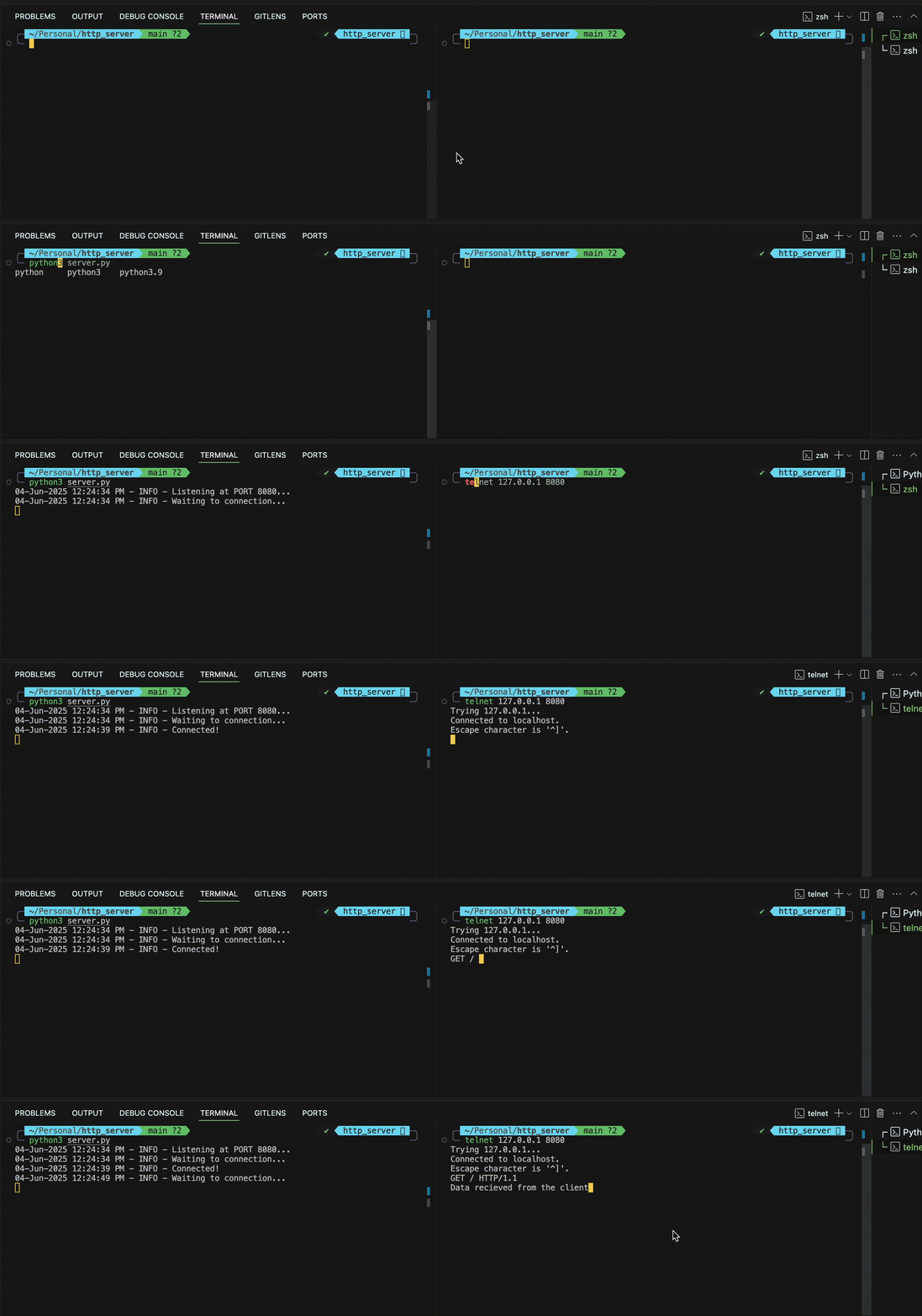
We just start the server in one windows which will be listening at port 8080. In the other window we first connect to the server using the telnet command. Then we send a GET request to the server. The server responds with generic hardcoded response for the all the clients.
How to handle GET/POST requests?
To handle GET/POST requests we need to first get the method and body of the request.
Accept requests from clients. Fetch the method and URL from the first line of the request. Later, find the body of the request from the data using the Content-Length header.
Below code snippet helps to find the request method and body.
def accept_tcp_connections(client_socket):
    # Set timeout for the client is connected but did not send any data (idle client)
    client_socket.settimeout(30)
    logging.info("Client Connected")
    chunk = ""
    content_length = 0
    try:
        # Iterating through the whole request body
        # Since request body can be more than the buffer size
        while True:
            request_data = client_socket.recv(BUFFER_SIZE).decode()
            chunk += request_data

            # If the request ends with "\r\n\r\n" then the body ends here.
            if "\r\n\r\n" in request_data:
                break

        http_headers, request_body = chunk.split("\r\n\r\n", 1)

        # Getting the content length of the request body
        for line in http_headers.split("\r\n"):
            if line.lower().startswith("content-length"):
                content_length = int(line.split(":")[1].strip())

        # Fetch the whole request body.
        while len(request_body.encode()) < content_length:
            request_body += client_socket.recv(BUFFER_SIZE).decode()

        method, path, _ = http_headers.split("\r\n")[0].split()

        logging.info("Processing the request...\n")

        # Simulate the delay for processing the request.
        time.sleep(5)

        if method == "GET":
            handle_get_request(client_socket, path)
        elif method == "POST":
            handle_post_request(client_socket, http_headers, request_body)
        else:
            handle_bad_request(client_socket)
        logging.info("Completed!!\n")
    except socket.timeout as _:
        logging.error("Connection closed to idle timeout")
        client_socket.close()
Handle the GET request for different URL. Sends different types of response for different Content-Type.
Here I have created a dummy API to respond to a particular API request from the client. It constructs different type of response such as JSON, HTML etc. Also, for a bad request it will send a plain text response.
# Handle the GET request for different URL.
def handle_get_request(client_socket, path):
    separater = "\r\n"
    if path == "/":
        # Sending HTML as the response
        with open("index.html") as f:
            data = f.read()
            response = (
                "HTTP/1.1 200 OK\r\nContent-Type: text/html\r\n" + separater + data
            )
            client_socket.sendall(response.encode())
    elif path == "/book":
        # Sending JSON as the response
        with open("book.json") as f:
            data = f.read()
            response = (
                "HTTP/1.1 200 OK\r\nContent-Type: application/json\r\n"
                + separater
                + data
            )
            client_socket.sendall(response.encode())
    else:
        # Sending response for the URL doesn't match
        data = "404 Not Found"
        response = (
            f"HTTP/1.1 404 Not Found\r\nContent-Type: text/plain\r\n" + separater + data
        )
        client_socket.sendall(response.encode())
    client_socket.close()
Now to handle a POST request, first we need to read the complete request body. The request body is JSON which
Handle the POST request by parsing the whole body of the request and provide the appropriate response dependent on the Content-Type of the request.
# Handle the POST request
def handle_post_request(client_socket, http_headers, body):
    separater = "\r\n"
    content_type = ""
    data = ""
    # Get the Content-Type from the headers to handle the request body
    for header in http_headers.split(separater):
        if "content-type" in header.lower():
            content_type = header.split(":")[1].strip()

    if len(body) != 0:
        # Handle the content type of JSON
        # POST request with JSON
        if content_type == "application/json":
            try:
                body = json.loads(body)
                body["id"] = 1
                data = json.dumps(body, indent=2)
            except json.JSONDecodeError as err:
                logging.error("Invalid JSON")
                pass

    # Response for the POST request.
    response = (
        f"HTTP/1.1 200 OK\r\nContent-Type: {content_type}\r\nContent-Length:{len(data.encode())}\r\n"
        + separater
        + data
    )
    client_socket.sendall(response.encode())

    client_socket.close()
If the request doesn’t match any of the method just return a generic response with correct status code.
def handle_bad_request(client_socket):
    message = "Handles only GET/POST requests."
    response = (
        f"HTTP/1.1 400 Bad Request\r\nContent-Type: text/plain\r\nContent-Length: {len(message)}\r\n"
        + "\r\n"
        + message
    )
    client_socket.sendall(response.encode())
    client_socket.close()
How to handle concurrency?
There is one issue with the above approach, if you fire multiple TCP requests at the same time, then the requests are not processed concurrently.
This can be a major issue, since there can be multiple requests coming at a time and it would take lot of time process if they are handled sequentially.
To solve this problem we can make use of threads and spawn a new thread for each request.
Modify the code as below to handle multiple requests.
import json
import socket
import logging
import threading

def accept_tcp_connections(client_socket):
    client_socket.settimeout(30)
    logging.info("Client Connected")
    try:
        http_headers, request_body = read_full_request(client_socket)
        request_line_parts = http_headers.split("\r\n")[0].split()
        if len(request_line_parts) == 3:
            method, path, _ = request_line_parts
        else:
            handle_bad_request(client_socket)
            logging.error("Malformed request line")
            return
        logging.info(f"Processing {method} {path} ...")
        # Method checks should be case-insensitive
        if method.upper() == "GET":
            handle_get_request(client_socket, path)
        elif method.upper() == "POST":
            handle_post_request(client_socket, http_headers, request_body)
        else:
            handle_bad_request(client_socket)
        logging.info("Completed!!\n")
    except Exception as err:
        logging.error(f"Exception in process_request: {err}")

with socket.socket(socket.AF_INET, socket.SOCK_STREAM) as server_socket:
    # Reuse the same port and IP if the server crashes
    server_socket.setsockopt(socket.SOL_SOCKET, socket.SO_REUSEADDR, 1)
    # Binding the socket at the IP (127.0.0.1) and PORT: 8080
    server_socket.bind((HOST, PORT))

    # Start listening to the incoming requests. (Max upto 5 connections)
    # If more try to connect then it may be rejected or experience delay
    server_socket.listen(MAX_QUEUE_SIZE)

    logging.info(f"Listening at PORT {PORT}...")

    # Infinite while to listen to multiple connections.
    while True:
        logging.info("Waiting to connection...")

        try:
            client_socket, addr = server_socket.accept()
            thread = threading.Thread(target=accept_tcp_connections, args=(client_socket,))
            thread.start()
        except Exception as err:
            logging.error(f"Error accepting connections: {err}")
Thread Pools
If we create a thread for each request then it might be create a bottle neck. Instead we can make use of Threadpools, which will offer a way to manage and reuse the threads.
In Python we use concurrent.futures module to create the thread pools
Just enhance the code by adding the following snippet.
from concurrent.futures import ThreadPoolExecutor

with socket.socket(socket.AF_INET, socket.SOCK_STREAM) as server_socket:
    server_socket.setsockopt(
        socket.SOL_SOCKET, socket.SO_REUSEADDR, 1
    )  # Reuse the same port and IP if the server crashes
    server_socket.bind((HOST, PORT))

    # Start listening to the incomeing requests. (Max upto 5 connections)
    # If more try to connect then it may be rejected or experience delay
    server_socket.listen(MAX_QUEUE_SIZE)

    logging.info(f"Listening at PORT {PORT}...")

    # This creates a pool of threads, which can have at max 3 threads at a time.
    # If there are more threads, they will be waiting in the queue.
    with ThreadPoolExecutor(max_workers=3) as executor:
        while True:
            logging.info("Waiting to connection...")
            client_socket, addr = server_socket.accept()
            future = executor.submit(accept_tcp_connections, client_socket)